Estimating that doesn't
slow you down.
Takeoff and estimating for electrical contractors, in the browser. Count fixtures, measure runs, read the panel schedules, and price the bid — on one plan, with your whole team.
No credit card needed · Nothing to install · Mac, Windows, Linux
See it work
From plans to bid in one minute.
Read the schedules, count every fixture, route the homeruns, price it and send the proposal. Real plans, real screens, no sound needed.
Schedules to takeoff
Read the schedule. Count the sheet.
Box a panel schedule, a luminaire schedule or a one-line diagram and get an editable table back. Map its columns to a template and the schedule becomes takeoff.
Create Takeoff finds each fixture's mark — the L1 or A2 beside the symbol — on the sheets you pick, and stamps the counts for you to review. One-lines are cross-checked against your panel schedules.
Addenda and change orders
The drawings changed. The takeoff doesn't start over.
Upload the addendum as a new version of the drawings. Every sheet shows at its newest issue, and your counts and runs come forward onto the reissued sheets, scale included — nothing re-counted.
A Diff overlay colours what's new and what's gone, and an export compared with a checkpoint lists each change as Added, Changed or Removed with the exact difference. Tag the extra work to a change order and it prices as its own mini-bid, rolls into the contract total once approved, and gets its own proposal PDF.
Route to…
Homeruns that route themselves.
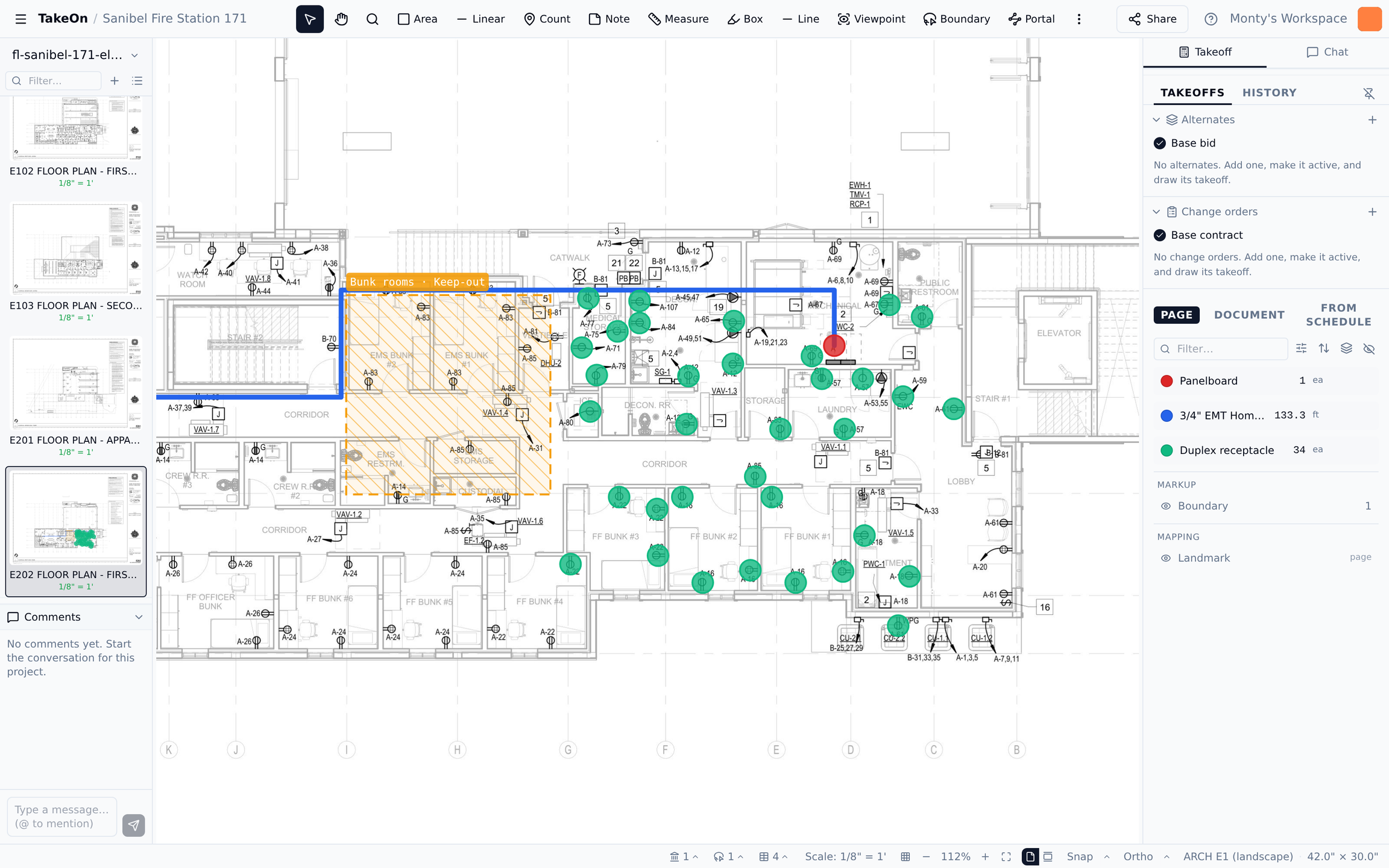
Mark your panels once. Pick Route to… from the end of a run and TakeOn takes the conduit there — around keep-out zones, alongside conduit already headed the same way.
Because your sheets are mapped to the building's column grid, a run can cross a match line or reach a panel on another floor, and every leg lands in your totals.
Find Similar
Count a full sheet in one drag.
Box one symbol and TakeOn finds every match on the page. You review them, then accept — the whole sheet counted, not clicked one at a time.
Templates and live totals
The spreadsheet's data model, on the canvas.
Define a Lighting fixture once, with the properties you bid by: type, wattage, voltage, circuit, mounting. Value lists keep everyone entering "2x4" the same way.
Annotations that share a template but differ in a property become separate groups, each with its own colour and live count. That rollup is your bill of materials — and once the template has a cost and labor hours, your bid.
Spec book
Ask the spec book. Get the page.
Drop in a 600-page specification and ask it a question in plain language — what conduit is required for branch circuits? — instead of thumbing through Division 26.
Every answer cites the pages it came from, and one click takes you there. It answers from your document, not the open internet.
Bring your own AI
Your takeoff, in the AI you already use.
TakeOn speaks MCP, the open standard AI assistants use to connect to tools. Point Claude — or any MCP client — at your workspace and it can read your takeoff and priced bid, search your spec book, pull your schedules, and look at a sheet.
We're not selling you another chatbot. You bring the assistant you already pay for and already trust; TakeOn hands it the facts. Ask in your own words, build your own workflows, and swap assistants whenever a better one comes along.
-
You pick what it sees. Choose the workspaces a connection can reach when you approve it. It can never widen its own access.
-
Read-only unless you say otherwise. Editing is a separate permission. Grant it and every change your assistant makes is labelled in the page history, where you can roll it back.
-
Some things stay human. No assistant can delete a project, change who a plan is shared with, or rewind a checkpoint. Revoke a connection any time from Settings.
Things you can ask
- How many Type A fixtures are on Level 2, and which circuits are they on?
- What does the spec say about conduit for branch circuits? Give me the page.
- Look at sheet E-201. Did we miss any receptacles in the break room?
- What's the sell price if the owner takes Alternate 2?
- Summarize the panel schedules as a load table.
Connect in a minute
Add TakeOn as a custom connector in your assistant, sign in, and approve the workspaces it can use.
https://app.takeonbid.com/api/mcp And the rest
Everything a takeoff tool should already do.
The parts that make it usable for an eight-hour day.
-
In the browser
No installer, no Windows VM, no license server. Sign in on any laptop and pick up where you left off.
-
Group by anything
Same template, different property values — separate groups, colours and totals. Roll up however the estimate needs.
-
Two estimators, one takeoff
Live cursors, live edits, comments on the project, and sharing down to a single plan. No file passing.
-
Exports that match your estimate
Totals to Excel or CSV with a column for every property, and a PDF of the sheets with your markups on them.
-
Takeoff to priced bid
Bid Summary with burden, tax, overhead and margin; a material catalog, assemblies, alternates, change orders, and a proposal PDF.
-
AI that waits for you
Find Similar, spec-book answers with page citations, sheets that name and scale themselves — every result is yours to accept.
The problem
Estimating software is stuck in 2002.
The desktop tools most contractors use were designed before web apps. They run only on Windows, keep each plan on one machine, and still hand the counts to a spreadsheet.
-
Locked to one machine
The plans, the tool sets and the takeoff all live on one Windows PC. The work can't follow you to a laptop, a second estimator, or the job trailer without copying files around.
-
Windows-only
Half your team is on a Mac and your takeoff tool isn't. One estimator becomes the bottleneck — and the only person who can open last quarter's plans.
-
Spreadsheets that don't talk to the plan
You count on the plan, type it into Excel, and catch the typo three days later. The markup and the bill of materials live in different files, edited at different times.
Versus the incumbents
What modern takeoff looks like.
Side by side with the desktop tools most estimators still pay for.
| Capability | TakeOn | Bluebeam | PlanSwift |
|---|---|---|---|
| Runs in a browser — Mac, Windows, Linux | — | — | |
| Templates with your own properties | — | Limited | |
| Takeoff grouped by any property, live | — | — | |
| Real-time multi-user on the same plan | Limited | — | |
| Find every matching symbol from one example | — | — | |
| Panel schedules and one-lines read into takeoff | — | — | |
| Homeruns auto-routed to the panel | — | — | |
| Drawing versions that carry takeoff forward | Limited | Limited | |
| Takeoff to priced bid and proposal | — | ||
| Connect your own AI assistant (MCP) | — | — |
-
Runs in a browser — Mac, Windows, Linux
- TakeOn
- Yes
- Bluebeam
- No
- PlanSwift
- No
-
Templates with your own properties
- TakeOn
- Yes
- Bluebeam
- No
- PlanSwift
- Limited
-
Takeoff grouped by any property, live
- TakeOn
- Yes
- Bluebeam
- No
- PlanSwift
- No
-
Real-time multi-user on the same plan
- TakeOn
- Yes
- Bluebeam
- Limited
- PlanSwift
- No
-
Find every matching symbol from one example
- TakeOn
- Yes
- Bluebeam
- No
- PlanSwift
- No
-
Panel schedules and one-lines read into takeoff
- TakeOn
- Yes
- Bluebeam
- No
- PlanSwift
- No
-
Homeruns auto-routed to the panel
- TakeOn
- Yes
- Bluebeam
- No
- PlanSwift
- No
-
Drawing versions that carry takeoff forward
- TakeOn
- Yes
- Bluebeam
- Limited
- PlanSwift
- Limited
-
Takeoff to priced bid and proposal
- TakeOn
- Yes
- Bluebeam
- No
- PlanSwift
- Yes
-
Connect your own AI assistant (MCP)
- TakeOn
- Yes
- Bluebeam
- No
- PlanSwift
- No
Based on publicly documented features as of 2026. Some gaps may have third-party workarounds.
-
Do I install anything?
No. TakeOn runs in any modern browser — Chrome, Edge, Safari, Firefox. Sign in, drop in a PDF, and start counting. There's no installer, no driver, no Windows VM, and no IT ticket.
-
Does it work on Mac?
Yes. TakeOn was browser-first from day one. We have Mac, Windows, and Linux estimators using the same workspace.
-
Can my team collaborate on the same plan live?
Yes. Two or more estimators can open the same plan and see each other's cursors and markups in real time. Edits propagate as they're saved — no file passing, no merge conflicts.
-
What about my existing Bluebeam files?
Bluebeam .bax import is on the next-up list. Today you can re-create tool sets as TakeOn templates (often in 10–15 minutes per trade) and use them across every project from then on. If your old markups need to live on, keep using Bluebeam alongside TakeOn for those legacy plans.
-
Is my data private?
Yes. Each workspace is isolated. We don't train models on your plans. You can export your projects to PDF and Excel at any time, so your data is never trapped.
-
How much does TakeOn cost?
TakeOn is priced per user, billed monthly or annually, with one plan that includes every feature. The per-user rate drops as your team grows, and annual billing works out to two months free. TakeOn is new, so teams joining now get founding customer pricing — well under half the list price, locked in for as long as they stay subscribed. The pricing page shows the price for your team size, and you can try TakeOn free before you pay anything — no credit card needed.
-
How do I get started?
Sign up and start using it right away — no credit card needed. Your trial includes every feature for 14 days, so you can run a real bid on one of your own plan sets. If you'd rather see it first, schedule a demo and we'll walk you through it.
-
I'm coming from PlanSwift / On-Screen Takeoff. Will it feel familiar?
The core motions translate directly: pick a tool, calibrate scale, count and measure. What's different — and what most users like immediately — is that TakeOn groups your annotations by their properties, so the BOM rolls up exactly the way your estimate needs. Price your templates and the same takeoff becomes a Bid Summary and a proposal, without a separate spreadsheet.
-
Can I connect Claude or another AI assistant?
Yes — bring your own. TakeOn has an MCP connector, so Claude (or any MCP client) can read your takeoff and priced bid, search your spec book, pull your schedules, and look at a sheet. You choose which workspaces a connection can reach and whether it can edit, and you can revoke it any time under Settings → Connected apps.
-
Does TakeOn support architectural and civil scales?
Both. Pick the sheet's scale from the common architectural and engineering (civil) scales, or type a custom one such as 3/32" = 1'. TakeOn also reads the scale off the title block when you upload a set, so most sheets arrive already scaled. Scale is per page, and a boundary can give a detail blowup its own scale. Scales are imperial today; metric is on the roadmap.
Ready when you are
Try it on your next bid.
Sign up, drop in a plan set, and start counting in minutes. No credit card needed.